That Siri AI waitlist 'fix' going viral does nothing. Here's the Apple code that proves it.
If you searched for a way past the Siri AI waitlist in the last few days, you found a Terminal command. Several of the pages still ranking for it were published in June and have never been corrected. At least one presents the command as working while its own comment section fills with people reporting that it does nothing.
We ran it on a MacBook Pro M4 Max on macOS 27.0, build 26A428, rebooted so it would actually load, and watched what the system did. Then we went further and read the code that makes the decision.
The finding is not that Apple patched the trick. It is that the trick never did what people thought it did.
Key takeaways
- The viral Terminal command writes a feature flag called
EnhancedSiriWaitlist, and Apple's own code shows that flag gates the onboarding prompt — not access control. People who ran it in the first beta watched the waitlist screen disappear and concluded they had skipped the queue. They had suppressed a screen. - The real gate is an account-level entitlement. macOS records its own reason for the block as
pendingEnrollment, and the eligibility system fails a single input —HAS_LINWOOD— written from a server response rather than from anything on disk. - We applied the command at 17:16:06, rebooted at 17:17:24 so the flag loaded at boot, and the system still reported the account as access-restricted 28 seconds into the new boot session. Both possible states of that flag were tested on the same hardware, with the same result.
- Apple built an override and then closed both routes to it:
forceWaitlistStatusrefuses to run on non-internal builds, and the managed-profile route rejects any payload without a valid cryptographic attestation. - A paid Apple developer account does not grant an internal build, and neither does any public or developer beta. There is no version of this you can run yourself.
Before you read on: are you even eligible?
A meaningful share of people stuck on the waitlist are not on the waitlist at all — they are ineligible, and the interface does not say so plainly. Check these four first.
- Device — iPhone 15 Pro / 15 Pro Max or newer on the phone side; Apple Silicon (M-series) on Mac and iPad. Intel Macs and pre-15-Pro iPhones are excluded outright.
- OS — iOS 27, iPadOS 27, or macOS 27. Not a point release behind.
- Language — device language and Siri language both set to English, and both set to the same English. A US system language with a non-US Siri language fails a check called
DEVICE_AND_SIRI_LANGUAGE_MATCH. - Region — a supported region. The EU and China are excluded for regulatory reasons, not technical ones.
If any of those is wrong, fix it and rejoin. If all four are right, you are genuinely queued, and the rest of this page explains what is holding you there.
What this page covers
- The exact command going viral
- What the code proves it actually does
- Where the real gate lives
- Myth vs reality: every workaround, checked
- What happened when we ran it
- Is there any override at all?
- So what actually works?
- How we verified this
The exact command going viral
This is the string being copy-pasted out of June how-to posts and into Terminal:
sudo defaults write "/Library/Preferences/FeatureFlags/Domain/GenerativeModels.plist" "EnhancedSiriWaitlist" -dict-add Enabled -bool NO
A second variant circulates on the Apple Developer Forums, which deletes the key instead of setting it:
sudo defaults delete "/Library/Preferences/FeatureFlags/Domain/GenerativeModels.plist" EnhancedSiriWaitlist
sudo reboot
Note that these two are opposites — one adds an override, the other removes it. Both are presented as the fix. That alone should tell you something. We tested both states on the same machine. Neither grants access, for the reason below.
What the code proves it actually does
The command writes a feature flag named EnhancedSiriWaitlist. Inside Apple's generative-experiences code there is a log line that states exactly what that flag governs:
Enhanced Siri Onboarding CFU: FF enhancedSiriWaitlist is OFF, skipping
The CFU is the onboarding prompt. The flag controls a screen.
That explains the original reports. In the first macOS 27 beta, people set the flag, the waitlist screen stopped appearing, and they reasonably concluded they were through. What changed in beta 2 was not a patch to a bypass — it was the surrounding code no longer coincidentally letting anyone past. There was never a lock to pick.
Everyone who "bypassed" the waitlist suppressed a prompt and mistook the silence for access.
Where the real gate lives
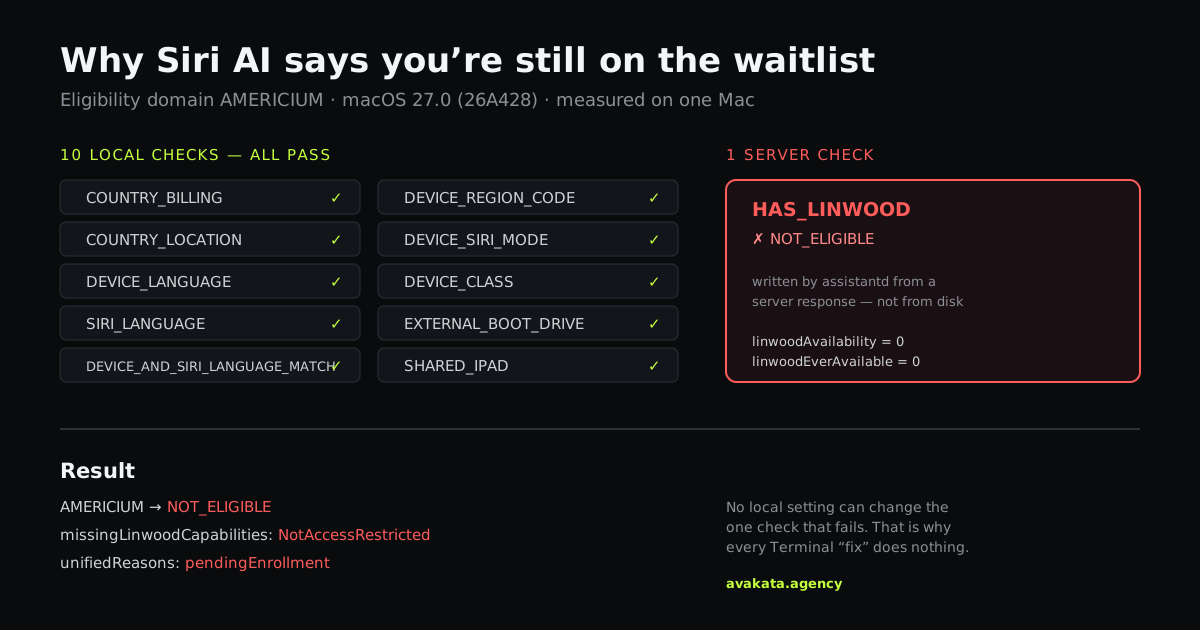
macOS keeps its own machine-readable reason for why Siri AI is unavailable. Decoded on our machine, it read pendingEnrollment — and the matching string in Apple's binary is blunter still:
device is still on waitlist (pendingEnrollment)
Underneath sits the eligibility system, which evaluates eleven inputs for the new Siri. On a correctly configured machine, ten of them pass. Exactly one fails: HAS_LINWOOD, where Linwood is Apple's internal codename for the new assistant. That input is written by Siri's daemon from a server response, not from anything you can edit.
One layer up, the capability check reports a single missing item: NotAccessRestricted. Everything else is green — the device is capable, the language is supported, the assets are present, the setting is on. The account simply has not been granted access.
Myth vs reality: every workaround, checked
EnhancedSiriWaitlist flag
Bypasses the server-side waitlist check
Suppresses the onboarding prompt (Enhanced Siri Onboarding CFU). The entitlement is never consulted, let alone changed.
Switching to a developer or public beta
Grants higher-priority access
Changes the client build only. The override it would need is guarded by not allowed on non-internal builds, and betas ship as ordinary user builds. Beta testers who already had access were reset onto the waitlist at public release.
Leaving and rejoining the queue
Refreshes your place in line
Nothing observable. There is no queue position in the data at all — only a boolean entitlement. Rejoining may reset your request.
Toggling Siri off and back on
Forces the system to re-check
This one does something real: it triggers a fresh server query. It just returns the same answer. We watched it return 0 four times in ten minutes.
What happened when we ran it
Feature flags are read at boot, so a reboot is the step most people skip. We did not.
17:16:06 Feature flag written in the bypass state 17:17:24 Mac rebooted — flag present and loaded at boot 17:17:52 Siri's daemon still reports the account access-restricted 17:26:36 Server re-queried — same answerThen the control condition, which is the part that closes it. The parent directory for that flag was itself created at 17:16:06, meaning the file had never existed before the command ran. The no-flag state is the one the machine had been sitting in all day while already blocked. Both possible states of the only lever anyone has published, tested on the same hardware, same result.
We also checked a second device on the same Apple Account — an iPhone 17 Pro Max, different silicon, correctly configured from the start, and with no feature flag on it because that file path is macOS-only. It reported the identical status. A per-device fault cannot produce identical state on two unrelated devices.
Is there any override at all?
There is a real one in the code. It is called forceWaitlistStatus, and it answers to exactly one thing:
forceWaitlistStatus: not allowed on non-internal builds
An internal build is an Apple-employee build. A paid developer account does not grant one, and neither does any public or developer beta.
The second route is a managed-device profile, and it is signature-verified. The code rejects a payload with no attestation, rejects an invalid signature, and ignores a verified payload whose value is anything other than accepted. You cannot forge it.
One more detail worth correcting, because it circulates too. The eligibility bypass flag people have latched onto is an output, not an input — the code writes it after you are already exempt or accepted. Setting it makes you eligible in roughly the way setting a thermostat's readout makes a room warm.
So what actually works?
Nothing you can run. That is the honest answer, and it is the reason this piece exists rather than another list of commands.
What we can offer is calibration. Reported waits on Apple's own developer forums run from 48 hours to twelve days, with the twelve-day case on a Mac. Wait times are inconsistent by design, because the rollout is staged rather than ordered.
- Do not repeatedly leave and rejoin the queue. It may reset your position. Keep the existing request active.
- Do not install a beta hoping to jump ahead. Beta testers reported the longest waits, and users who already had Siri AI working in the beta were pushed back onto the waitlist at public release.
- Do check the four prerequisites above. If they are all right, there is nothing left on your end.
How we verified this
Everything above came from one Mac and one iPhone rather than from repeating other coverage: a full sysdiagnose capture including the eligibility state file and the system log archive, the availability preference read directly for the pendingEnrollment value, string extraction from the dyld shared cache for the capability names and both override guards, and boot times confirmed against the kernel so we knew the flag was loaded before the checks ran.
Strings quoted are from macOS 27.0 build 26A428. Linwood, Campo and the eligibility domain names are Apple's internal codenames as they appear in that build, not official product terminology. If you have a build where any of this behaves differently, we want to hear about it and will update this page.
Frequently asked questions
Does running the Terminal command put my Apple account at risk?
We found no evidence that writing this feature flag has ever triggered an Apple account action. It is a local preference write on your own machine, not a circumvention of a licensing or DRM system, and the flag it touches governs a prompt rather than an entitlement. That said, it requires sudo, it modifies a system preferences domain, and it does nothing. There is no upside. If you already ran it, deleting the file returns your Mac to its stock state.
Will switching to the developer or public beta get me in faster?
No, and the evidence points the other way. Beta testers reported the longest waits during the beta period, commonly one to two weeks. More tellingly, users who already had Siri AI working in the beta were reset onto the waitlist when iOS 27 and macOS 27 shipped. The entitlement is evaluated against your Apple Account, not your build, so changing channels changes the client without changing the thing being checked.
How long does the Siri AI waitlist actually take?
There is no published timeframe and no queue position. Reports on Apple's developer forums range from 48 hours to twelve days, with some users admitted within minutes of joining and others waiting more than a week on identical hardware. The rollout appears to be staged rather than first-come-first-served, which is why two people who signed up at the same moment can get very different answers.